Volta Studio
How to keep an AI character consistent.
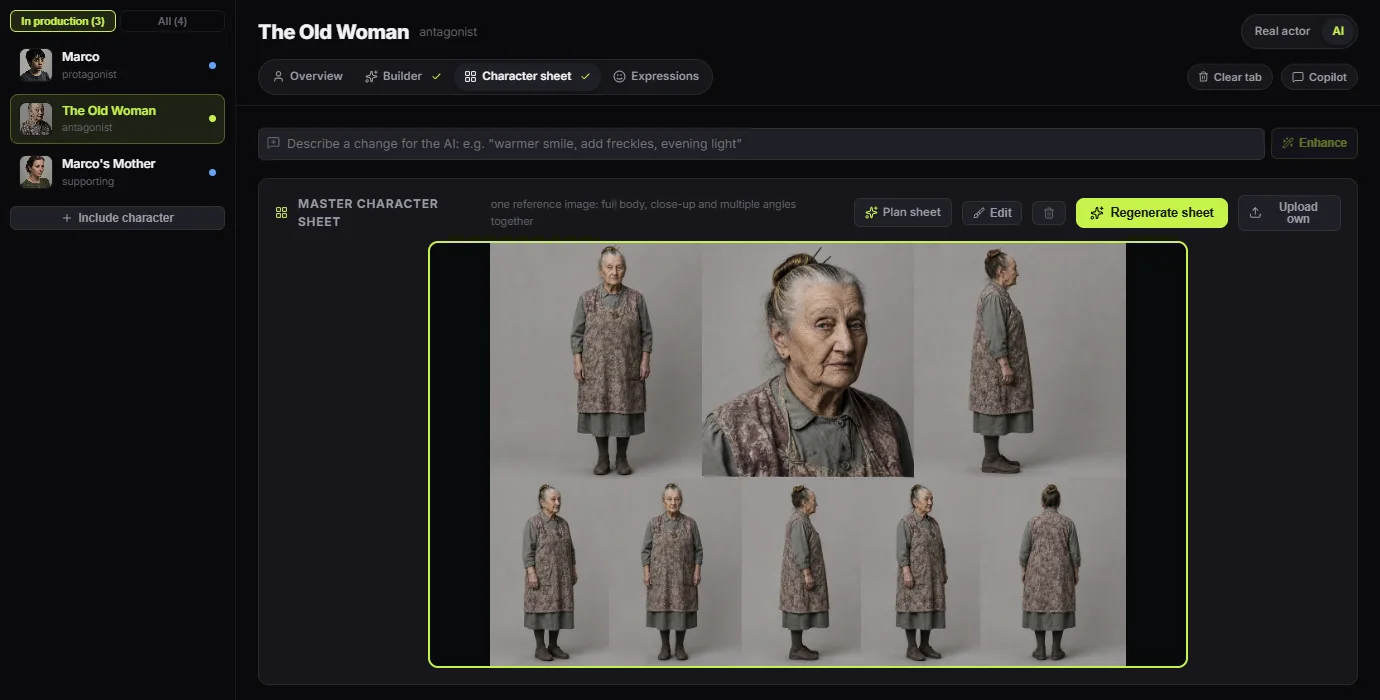
To keep an AI character consistent, stop describing the person in words and give every shot the same pictures. In Volta Studio a character has one locked portrait and a character sheet, made once, and each shot of the film is sent them with its scene and the look of the film, so the same face reaches the next shot and the next episode.
Why do AI characters change between shots?
A video model has no memory of the last shot. Every generation starts again from what it is given, and words leave too much open: "a tired woman in her sixties" fits a thousand faces. A new angle or new light then pushes the guess further, and small changes add up over a scene.
What holds a face, and what does not?
In our own test in October 2026, a character sheet on its own lost the face, and a portrait and a sheet sent together held it. The portrait says who this is, and the sheet says how they look from every side, so Volta sends both, with the sheet the first thing to give way on a model that takes few pictures.
Six steps, in order
Set the look of the film first.
Choose the render style and fill in the style bible on the World page before making anyone. Cast, locations and props inherit it, so a character is not designed for a different film from the one they appear in.
Make one portrait and accept it.
Generate on the character's page until a face is right, then accept it. That picture is the identity from here on. Regenerating it later means a new person, so take the time here.
Build a character sheet from the portrait.
One picture holding the close-up, the full body and several angles, made from the accepted portrait. It carries the body and the clothes that a head and shoulders cannot.
Dress them per scene.
Add outfits on the Wardrobe page and choose one for a scene. The shot is then told what they wear here, and the clothes do not change between takes of the same scene.
Start each shot from a still.
Make the frame first and accept it, then make the video from that frame. A still is cheap to redo and shows at once whether the face held, and a video that starts from a right frame stays closer to it.
Generate from the shot, and judge by eye.
Generate from the shot itself, so the portrait, the sheet, the outfit and the location travel with it. Compare takes side by side and keep the one that matches. Consistency is a choice you make at the end, not only a setting.
Common questions
- Why does my AI character look different in every shot?
- Because each generation starts from scratch and words leave the face open. Give the model the same pictures every time: an accepted portrait, a character sheet, and a frame to start from. Volta sends these from the character's page with every shot.
- Do I need to train a model of my character?
- No. Volta works from reference pictures, so there is no training step and nothing to wait for. A character is ready once the portrait is accepted and the sheet is made.
- Can two characters stay consistent in one shot?
- Yes, each with their own portrait, and more people in frame makes it harder. Models limit how many pictures they take, so Volta sends the people in that shot first and lets the extras give way. Keep crowded shots wide and check the faces closely.
- Does this work across a whole series?
- Yes. A character belongs to the project, so every episode of a series starts from the same portrait, sheet and wardrobe. Story memory also keeps the facts about them, such as a scar or a ring, in front of the copilots.